`, the composite kind would be `(exn libyaml
)`
- in the `exn` field, it will contain properties listed below:
- `'message`
### Values in `yaml.h`
[libyaml.ss](.) will
export enum members and functions in
[`../git/yaml/libyaml/include/yaml.h`](../git/yaml/libyaml/include/yaml.h) from
submodule [`../git/yaml`](../git/yaml/libyaml).
Functions and enum members can be used in scheme code as
scheme variable or procedure.
> Note that you may install libyaml development package in your system,
> but [libyaml.ss](.) will use the *yaml.h* in
> submodule *src/libyaml* but not the yaml.h in your system
### yaml and scheme
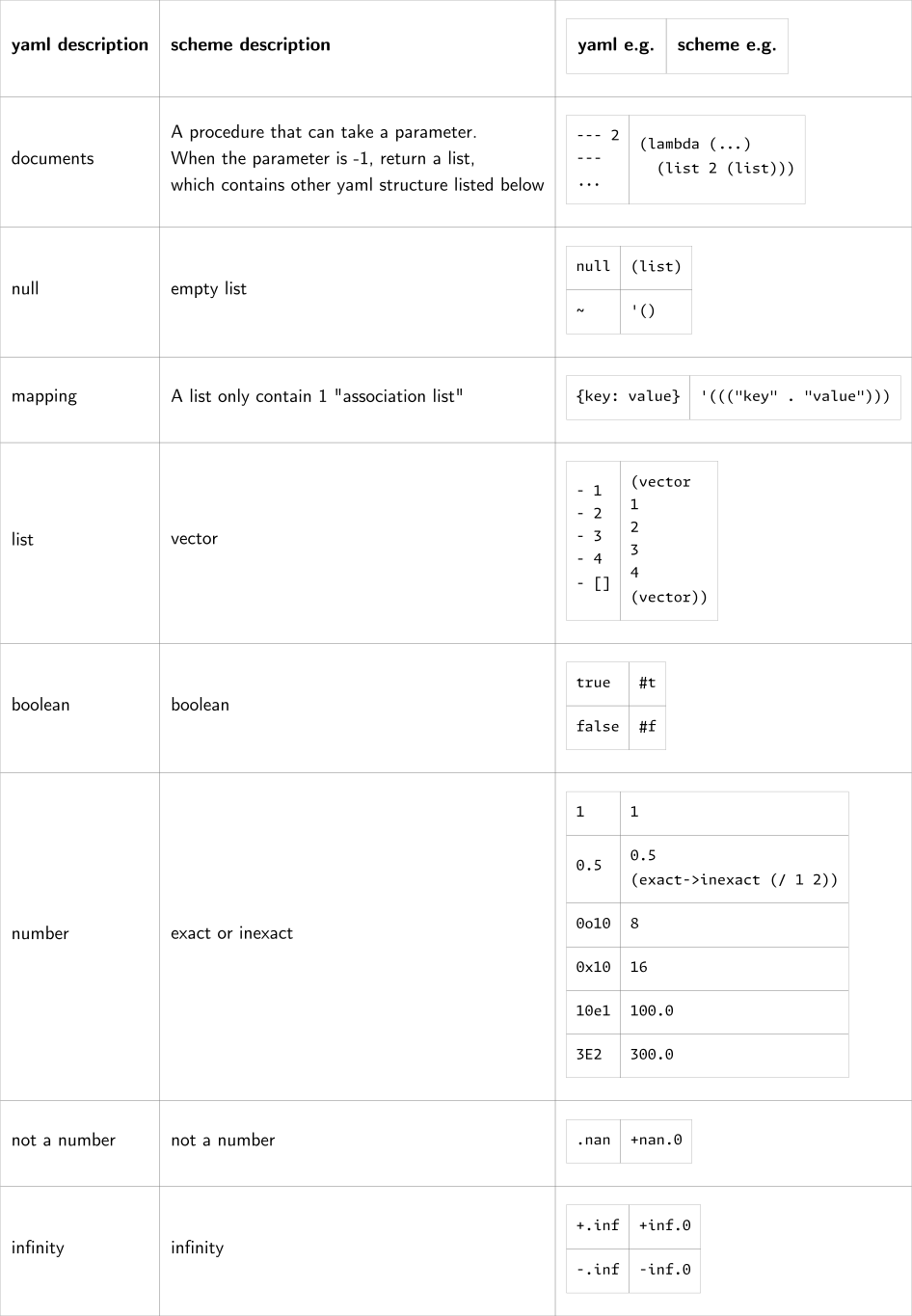
The chart below define mapping between yaml structure and scheme structure.
### Read yaml
```lisp
(yaml<- . |Parameters|)
```
#### Return value
`yaml<-` will return a procedure that generate yaml-documents:
- the **procedure** take 1 or no parameter
- if 1 parameter, it must be a non-negative integer or `-1`
- for `-1`, return a scheme-list of all yaml-document
- for positive integer ***n***, return the ***n-1***th document.
Index from `0` but not `1`
- if no parameter, return the 1st document.
Equal to parameter is `0`
For example:
- `(yaml<- "--- 1\n--- 2\n...")` will return a procedure
- `((yaml<- "--- 1\n--- 2\n..."))` will return `1`
- `((yaml<- "--- 1\n--- 2\n...") 0)` will return `1`
- `((yaml<- "--- 1\n--- 2\n...") 1)` will return `2`
- `((yaml<- "--- 1\n--- 2\n...") -1)` will return `'(1 2)`
- `((yaml<- "--- 1\n--- 2\n...") 2)` will abort by exception
#### Parameters
Parameters to `yaml<-` can be
a sequence that contain 1 or more element listed below,
order is not sensitive:
- yaml input
- *format*:
- String or input port
- *description*:
- Read yaml from it.
- If it was a port and `#:close-input-port` was not set,
you need to close it manually if necessary.
- when it was string, it should be yaml content but not file path
- *if-necessary*:
- No
- *if-not-set*:
- `(current-input-port)` will be used
- `#:close-input-port`
- *format*:
- set or not
- *description*:
- If finally close the input port when yaml input is a port
- *if-necessary*:
- No
- *if-not-set*:
- The port will keep opened
- `#:encoding`
- *format*:
- `(cons #:encoding ?)`
- Where `?` should be one of below:
- `YAML_ANY_ENCODING`
- `YAML_UTF8_ENCODING`
- `YAML_UTF16LE_ENCODING`
- `YAML_UTF16BE_ENCODING`
- *description*:
- Set encoding to `?` when reading yaml
- *if-necessary*:
- No
- *if-not-set*:
- Dependes on the source in [git/yaml/libyaml](git/yaml/libyaml).
Currently `YAML_ANY_ENCODING` should be used if not set
#### Examples
```lisp
((yaml<- "--- 1\n--- 2\n...") 1)
```
```lisp
(yaml<-
(open-input-file "/dev/null")
`(#:encoding . ,YAML_UTF8_ENCODING)
#:close-input-port
)
```
```lisp
(call-with-input-file "/dev/null"
;`call-with-input-file` will close the port,
;so don't set `#:close-input-port` in `yaml<-`
(lambda (file) (display ((yaml<- file) -1)))
)
```
### Dump yaml
```
(<-yaml . |Parameters|)
```
#### Return value
- If `#:close-output-port` was set
- return result of `close-output-port`
- If `#:close-output-port` was not set
- return `(void)`
And `<-yaml` will output the yaml content to the output port.
For example:
- `(<-yaml ((yaml<- "1")))` will output `--- 1` to `(current-output-port)`
#### Parameters
Parameters to `<-yaml` can be
a sequence that contain 1 or more element listed below,
order is not sensitive:
- Scheme structure to be output
- *format*:
- Refer to *#yaml and scheme#* section,
Any valid (nested)structure listed in the chart,
and no need to wrap the scheme structure in a procedure by default.
See `#:strict-input` below.
- *description*:
- Convert the scheme structure to yaml
according to the definition in *#yaml and scheme#* section
- *if-necessary*:
- YES
- *if-not-set*:
- Abort a condition
- `#:strict-input`
- *format*:
- set or not
- *description*:
- The *#yaml and scheme#* section
only defined the behavior when the parameter is `-1` for yaml-document,
while `yaml<-` return a more specific procedure.
If `#:strict-input` was set,
`<-yaml` will check if the structure to be outputed
match the return value of `yaml<-`,
but not only test definition in *#yaml and scheme#* section.
- *if-necessary*:
- No
- *if-not-set*:
- `yaml<-` will not strictly check
if the structure to be outputed match the format of `yaml<-` return value
- `#:port`
- *format*:
- `(cons #:port ?)`
- Where `?` should be a output port
- *description*:
- Output yaml content to the port
- If `#:port` was set and `#:close-out-port` was not set,
you need to close it manually if necessary.
- *if-necessary*:
- No
- *if-not-set*:
- `(current-output-port)` will be used
- `#:close-output-port`
- *format*:
- set or not
- *description*:
- If finally close the value of `#:port`
- *if-necessary*:
- No
- *if-not-set*:
- The port will keep opened
- `#:encoding`
> The same as `#:encoding` parameter to `yaml<-`
#### Examples
```lisp
(<-yaml #:strict-input (yaml<- "[1]"))
```
```lisp
(<-yaml ((yaml<- "[1]")))
```
```lisp
(<-yaml #("1st" ()))
```
```lisp
(<-yaml `(#:port . ,(current-output-port))
((yaml<- "---\n---\n---\n[1,2,3]") 2))
```
### Check the structure
All check are supposed to be based on definition in *#yaml and scheme#* section.
---
```lisp
(yaml? ?)
(ydoc? ?)
```
Check if `?` is a scheme structure that match a yaml-documents
`ydoc?` just check if the procedure valid when take `-1` as parameter.
`yaml?` will check if `?`: totally match
the format of `yaml<-` return value
---
```lisp
(ymap? ?)
(ymap?? ?)
```
Check if `?` is a scheme structure that match a yaml-mapping
`ymap?` only check the top level, a list that only contain 1 alist
`ymap??` will recursively check if each part of `?` is a legal structure
---
```lisp
(ylist? ?)
(ylist?? ?)
```
Similar to `ymap?` and `ymap??` but check yaml-list not yaml-mapping
---
```lisp
(yscalar? ?)
```
Check if `?` is a scheme object that match to a yaml-scalar
---
## Examples
In the API section, in each API subsection,
there are examples for single call at the tail of subsection.
And here is a complete example including read/write/modify.
For a yaml content:
```yaml
- replace me: This will be changed
- a internal mapping:
replace me: This will be changed
- replace me
- - replace me
- ignored
- "3.32" # string , also ignored
- 3.32 # number, also ignored
```
Assuming it was saved in file `/tmp/tmp.yaml`,
we don't know the content of it,
but we need to modify its content:
- if `replace me` is a key of mapping, replace the value to `